Posts

Count by Color in Google Sheets
Image
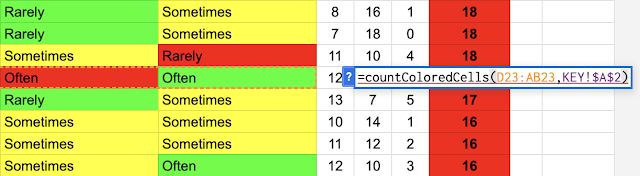
 Hello everybody! Are you familiar with the function COUNTIF in Google Sheets? You can count how many cells match a certain criteria from a range. But what if what you need is to count the color of the cells? That is not currently possible. I came across a situation in which I had applied individual conditional formatting to 25 different columns. The words didn't match amongst them, but the colors were the significant piece. I needed to count how many cells had a certain color.  I Googled and looked to see if anyone had gone through a similar situation. Yay! I came across exactly what I needed! Count Cells by Color  (link here!) Here's the website I found. It shows 3 different methods. I chose to use Method 1. This method requires you add a script to your sheet. The link provides the script. All you have to do is copy/paste and follow the instructions. Once you have added the script you can start using the new function " =countColoredCells(RANGE, DESTINATION COLOR) "....


YouTube Clips - Life Saver!

Image
 Hi all! I was watching a YouTube video yesterday and suddenly noticed that in the options below the video is an icon called "Clip".  I was curious and clicked on it. Oh wow! This feature is so useful! I've been sharing parts of videos using the embed code and then tweaking it a little bit. Here's a video where I explain this . This is so much easier to use and share! It seems to be currently in a trial period. It only works if you are logged in to your YouTube account. Also, take note that the clips you create are saved in your Channel. There's a new tab for Your Clips. Allowing people to create clips on your videos seems to be an option that you can enable or disable. However I don't find that option yet in my settings. This page explains a little more on how Clips works. Stay posted and if you see it, give it a whirl! Cheers!

Auto-Translate Youtube Videos

Image
 Hello everyone! I was challenged recently on finding a way to translate a Zoom recording from Spanish to English. As we already know, Zoom provides closed captions but only in English. If the meeting was going to be in Spanish, the CC option wouldn't work for us. It seems you would need to add a third party option to translate the CC into another language. I remembered trying to translate a video on Youtube some time ago and decided to give it a try. It was a charm and worked just as expected! Here are the steps: UPLOADING VIDEO: 1- Record the video. 2- Upload video to Youtube channel (make sure your channel is verified in order to upload longer than 15 minute videos). 3- Wait for the video to be processed. 4- Get sharable link to the Youtube video. NEXT STEPS ARE FOR VIEWERS: 5- Open the Youtube video in another tab. 6- Wait until the CC button appears (it takes some extra processing time). 7- Turn on the CC option. 8- Go to Settings (gear) and turn on Subtitles. 9- Choose Auto-t...

¿Qué aprendimos a un año de educación a distancia?

Image
Hello! This is my 5-minute participation at the ADE Virtual Summit 2021. I talked about the work we did this school year of gathering first hand data about what Distance Learning looks like at ASFM. This video is in Spanish. Cheers!  

Distance Learning Highlights

Image
Hello everyone! What a year! This whole school year has been in Distance Learning mode at my school. To gather a big picture perspective of what learning looked like, during the first semester the innovation team visited virtual classes from Nursery to Grade 5. The goal was to observe what was actually happening. We gathered a lot of notes and have summarized them in the following visual. We continued with the following grade levels throughout the second semester  and will share our key findings in the future. Cheers!  

Putting Together a Schedule Just Got Easier!

Image
For the past 6 years I have been putting together the schedule for the sessions for our conference Live Curious, Go Beyond . I have a large white writable wall behind my desk. I loved using color-coded sticky notes and placing them over a grid I would draw on the wall.  It was a system that worked quite well. I could easily make adjustments and the schedule was at a glance. I did have to be careful to take a picture before going home in case any sticky note fell over night. This is what the 2020 schedule looked like: However, at this time around, due to the Pandemic, I was not in school. So I tried a different approach. I had used occasionally Jamboard and seen how teachers were using it with their students and group work. So I gave it a try. Jamboard to the rescue! It was just what I needed! I was able to create colored sticky notes, move them around easily, and best of all, copy/paste and resize them. Another beauty is the ability to duplicate the page, therefore I could experim...

How I got started in education...

Image
 Hi all, I came across this today and sharing here. This cartoon depicts how I got started with education. 😉

Voice Feedback in Google Docs

Image
Hi! I was recently asked by a teacher how she could provide voice feedback in Google Docs. Sometimes, it's better to record your feedback, rather than writing a long note, and I'm pretty sure students would appreciate listening to their teacher's voice too! Here are some options I found. They all work for Google Docs. Some will mention if they work on Google Slides or Google Classroom too. Mote This is a Chrome extension. The basic plan has some limitations , but it's ok. Mote creates a link to the voice note in a comment box. For a better experience, the kids would also need to install that extension, that way they wouldn't be taken out of the Google doc to listen to the message and could play directly in the comments box. Works the same also in Google Slides and in Google Classroom. Read&Write This is another Chrome extension, which also has other cool features you might like. Again, to better experience this feedback option, it is recommended that the student...

25 Years and Counting

Image
Hi everyone! I posted this on Facebook today, but thought I'd include it also in my blog since I think it's a huge accomplishment. 1996-1997 Today marks my 25th back-to-school at ASFM. 👩‍💻 I feel so blessed and grateful to be a part of this community. 🤗  Twenty-five years ago, I switched jobs, from 5 years at another school to a new one. I had 4 job offers to choose from. It was not an easy decision, because it wasn't only what was best for me, but because my kids would be joining the school too. After thinking it carefully, seeing pros and cons, and talking with friends, I chose ASFM. On the first day of school, as I entered the building, the principal was at the entrance greeting students and she turns to me and says "Good morning Diana!". I thought, "What! She knows my name!!" That's when I knew I had made a good choice and I would be all right. 1996-1997 1996-1997

First Lego League Jr.

Image
For the past years we had attempted to run a FIRST Lego League after school club. It was an amazing experience and the kids were really engaged, however, the timing just wasn't right. We met every Monday after school for one hour, all through the first semester of school. By the time we received the challenge kit, we were already about half way through the weeks. That didn't leave much for us to be able to complete all the tasks and be prepared to participate in the competition. So, this year, we switched to running a FIRST Lego League Jr. club instead. This meant another age range of students and another set of skills, but we were willing to give it a shot. Keep reading to see how it went. The BoomTown Build Challenge We targeted students in grades 1 and 2. We formed a team of 6 students. The kids grouped in pairs. The kids decided on the name of their team: "Pizza Boogie Party" Prior to the arrival of the challenge kit, we practiced building with Legos...

Making Password Cards from a Google Sheet

Image
Hi! At our school, students get started with Google for Education accounts in grade 2. The randomly generated password provided to students is a real challenge for them to type, not to mention to memorize. So students practice logging in to their Google account multiple times in their Technology class. The teacher has an index card with each student's name, username, and password. She hands them out to students in need, until eventually, they don't request it any longer. With 160 students in the grade 2 generation, it's a daunting task to try to manually create these cards and avoid making any mistake. I found a way to automate this task and eliminate any errors and provide a similar solution as to what the teacher currently was successfully using. Here are the steps to follow. 1- Create a list with all necessary data in Google Sheets. The names of the column headers will be used in the following steps as fields. For example: 2- Create template in Google Slides O...

A Presenter's Worst Nightmare

Image
A couple of weeks ago, our innovation team was in charge of running a PD afternoon. Every Tuesday, students are dismissed earlier, and teachers stay a little longer. This time is dedicated to professional development or other staff needs. Since we continue to support the blended learning goal we decided to offer workshops about tools that aligned with this. We invited three innovator teachers to participate as well, for a total of five sessions on: Brainpop, Flipgrid, Adobe Spark, Creation of Gifs, and Flippity. I was going to run the session on Flippity . As the site describes it: "Easily turn a Google™ Spreadsheet into a Set of Online Flashcards and Other Cool Stuff" . I thought the teachers would love to create online resources with which the kids could interact, and it's so simple to use. The day came. We divided the afternoon in two and would repeat the 5 sessions in each block of time. We had sent out a Google Form with the description of each tool so teachers c...

Redesigning a Kinder Classroom

Image
Hi all! In this post I am including the story of the design process followed for another of the classrooms that I helped redesign. This is a Kinder classroom. Cheers!

Redesigning a Classroom

Image
Hi all! In this post I will only include the report of the design process followed for one of the classrooms that I helped redesign. This is a first grade classroom. Cheers!

ECSTEM 2019

Image
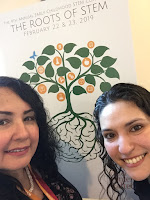
Last week I attended the ECSTEM conference for the first time. Ever since I heard about it I was so interested since it was especially about my current interests - Early childhood and STEM. My takeaways from the conference are: STEM can be integrated into all subject areas. SEL can be supported through STEM activities. Problem solving and other competencies can be developed through STEM experiences. STEM activities can be planned with ordinary materials we have laying around the school or house. STEM and play go hand-in-hand. Importance of asking WH questions when working with students and STEM. Engineering builds strong life-long skills. In general I saw much representation of Science (S), Arts (A), and Engineering (E), a little less of Math (M), but no Technology (T) at all. With technology I mean robotics and coding. In fact, I was in disbelief when I learned that there would be no wifi available in the conference rooms. Well, that was how it turned out to be. In fac...

Live Curious, Go Beyond 2019

Image
This 5th edition of Live Curious, Go Beyond was a huge success! Year after year the number of attendees has increased and this was no exception. We had 507 registered participants and 52 different educational institutions represented at the conference. Organizing and planning the conference is a lot of work that takes months to prepare, but we are not alone. We are fortunate to count on a large group of leaders and volunteers that give up their time to make sure the conference is a success and runs smoothly. Some highlights of the conference are: The participation of two outstanding keynote speakers: Jennie Magiera and Ken Shelton, from the EdTechTeam. They set the tone and inspired all teachers to live curiously and go beyond.  Another important achievement was the pre-conference, run by High Tech High.  Concurrently to all the sessions happening, there was a Tinker & Make workshop for kids only.  In the main hallway, Apple Education installed a playgro...

Robotics in Elementary

Image
A few days ago I was asked to share my experience with  FIRST Robotics in Elementary. Preparing for this interview made me reflect on the value of having a robotics program, of any kind, in every school. How has the ASFM FIRST program impacted you? Through tech classes elementary students have always been exposed to building and programming robots for several years now. However, last year we learned about FIRST robotics and introduced the FIRST Lego League in Elementary as an extracurricular activity. We started with one group of students and this year we had another group of kids for the Lego league and expanded to 3 groups for the First Lego League Jr. We have seen an increased interest in students wanting to participate. Although students continue to experience robotics in their regular tech classes, the FIRST Lego League extra curricular activity has a competitive component as well as collaborating to solve a real world problem. Why is FIRST essential to learning at ASFM...

First Lego League - Y2

Image
This is the second year that we offer the FIRST Lego League Robotics after school academy. Last year, due to the competition dates that coincided with our holidays, we were not able to complete the program and take our kids to the competition. But this year promises to be different. The date for the competition does favor our school calendar and the team is working hard and has advanced throughout the semester. This is what's happened so far on Mondays after school: • Learning about the Into Orbit challenge, the FLL program, and the core values.   • Deciding on which challenge to work on. (Building houses in space) • All together the team builds the Lego Mindstorms EV3 robot.   • Practicing coding skills as they await for the mission models to arrive. • Mission models arrived! Time to build all of them.   • Setting up the challenge table. • Deciding on the team's official name. ("Techno") • Challenge table is ready! • Working on program...