Posts

Action Plan Time

Greetings ! Would you like to be able to find many ideas on how to integrate technology to your daily lesson plans and target various instructional strategies, all in one single place ? How? Keep reading... As part of my Action Plan, that followed to my attendance to the Google Teacher Academy MTV12, I proposed a project in which the idea is to create a toolbox for teachers with resources, provided by teachers, in which technology supports the GANAG lesson schema, created by Jane E. Pollock and the 9 high yield instructional strategies, by Marzano, Pickering and Pollock. If you're not familiar with this lesson design and strategies, visit this li nk and the ones included below to learn more.  Project Description: To create a database that will provide ideas, tools, and examples on how to integrate technology to each of the steps in the GANAG lesson schema and the 9 high yield Instructional strategies ( Classroom Instruction that Works, Marzano, Pickering...


Creating QR Codes

Image
Last week, fourth grade students started working on a project about Native Americans. They will create an exhibit of the different tribes that includes artifacts, pictures, posters, and QR codes. Parents will be invited, along with other teachers. The kids are so excited preparing for this special day! What is new to the kids is what is a QR code, how to create one and what to do with it. Well, QR code stands for Quick Response code. It works in a similar way as barcodes do. In this case, the image is a matrix that shows an arrangement of squares.  A QR code contains information. It could be a URL, text, a telephone number, etc. In order to "read" a QR code, you will need a QR scanner. There are apps you can download to your mobile device and easily read these codes. The iPad app we use at school is called " Scan ". There are two QR code generators I suggest using : QR Stuff In this application, you ...

Twitter for your PLN

Image
Hi! A few days ago I was reflecting on how much Twitter has helped me to grow professionally. In a short time I feel my learning curve has skyrocketed. It also made me realize that there are very few teachers in my school that actually use Twitter. So, I decided to spend this week's training time on evangelizing Twitter and showing them how to form a professional learning network (PLN) through Twitter . Yes, there are other ways to form a network, but not as easy, quick, and simple as Twitter. Just join Twitter, start following the right people, and see the flow of knowledge instantly pour in! You can't go wrong. Focus on your interests and look for who shares them too. Why tweet? Create a community with people sharing your same interests. Find recommended articles, books, web sites, information, tips, etc. Stay up-to-date Open a window and see what others are reading, doing, saying, thinking. Basics things to know: Compos...

More on Google Drive

Hi! A few weeks ago I had written about a few pointers related to Google Drive that have changed the user's perspective. Now I want to share a presentation I prepared this week at school that shows more things to keep in mind when working with the Google Drive user interface.  It's been a slow transition, but we're getting the hang of it now! Cheers Cheers!

21st Century Learning & Technology

Happy New Year! I wish you all the best in 2013! Wow! We had a great start of the year at school today. After the Christmas holidays we came back to a full PD day. At this time we were honored to have Pam Allyn, author of many books and director of LitWorld and LitLife . My takeaway from today's sessions is: How can the 21st century tools help bring out the best of each and every child? Nowadays, everyone can get what they need from anybody. The challenge we face now is how to ask the right questions. 21st century school can help empower the shyest and most fearful child. Characteristics of 21st century learners: Connected, Collaborative, Critical Thinkers, Creative, Independent, Empathetic A paradigm shift is focusing on technology-based genres of text. For example, write a long essay and a short essay in Twitter form. The 21st century tools contribute to building empathy in the children. For example, in the community created in Facebook, in ...

"I don't like Google Drive!"

Image
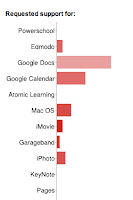
I keep what is called a "contact log". This is a Google form in which I keep track of who I have helped and what was their need. I'll be honest, I have missed many entries, especially if they happened informally in the hallways, but I can still get good data. As the first half of the school year ended, I decided to take a look at the results gathered so far. I was not surprised to see that the number one request had to do with Google Docs. Our school started using consistently GAFE this year. So, I can imagine it must be very frustrating for some teachers to be forced to use a tool they are not comfortable with. Of course, I remember the frequent comment from teachers saying, "I don't like Google Drive! Is there something I can do?" All it took was to give them a few recommendations and that was enough to make their day! Here they are, from simple to complex (or should I say, from very simple to less simple) that have changed t...

Instructional Strategies & Google Docs

Image
This week at school we've been preparing for an upcoming professional development day taking place in January. This day will focus on the 9 H i gh Yield Instructional Strategies . We will have Jane E. Pollock, author of "Improving Student Learning One Principal at a Time" ,  visiting our school. She will follow-through on her visit from last year and the work done by all teams and how they've incorporated the GANAG schema and the instructional strategies to their lesson plans. As I was preparing for my team meeting, I thought, "How can Google Docs and Apps support this initiative?" This is what I brainstormed: 1. Identifying Similarities and Differences Use the Spreadsheet chart capabilities to prepare comparisons. Use the Drawing doc to create a mental map. Use a Form to collect data that can later be graphed. 2. Summarizing and Note Taking Student takes notes in a Document created by him or the teacher shares a pre-for...